On-Premise PoC Deployment Guide for Gatekeeper
This guide is intended only for Proof-of-Concept (PoC) deployments of Gatekeeper on an on-premises environment. It is not suitable for production use.
Pre-requisites
XShield on-premises platform must be deployed. Follow the XShield on-premises deployment guide.
Ensure that you have the following resources available to deploy the Gatekeeper box or VM:
- 4 vCPU
- 16 GB RAM
- 100 GB Disk
Gatekeeper installation options
Gatekeeper can be installed using:
- ISO
- OVA
- Debian Package
Download links for each option is available at <on-premise-ip>/sensors/appliances/install-appliances
Gatekeeper Deployment
Follow Gatekeeper Deployment Guide for detailed steps.
Refer Virtual Gatekeeper Installation for OVA installation.
Gatekeeper Configuration for On-Premise
Once Gatekeeper is deployed, follow the steps in Gatekeeper Registration for steps to configure the gatekeeper.
IP Based Deployment: Enter the IP address of XShield Platform as Colortokens site during registration.
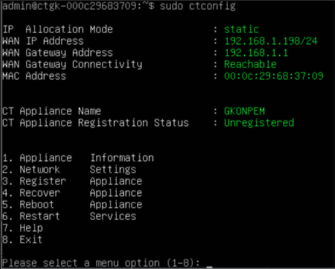
After gatekeeper is registered and visible on the platform UI, follow Gatekeeper Configuration UI for any configuration changes you need to make.
Troubleshooting
For detailed troubleshooting information, refer to the On-Premise deployment guide.