Tenable Vulnerability Management and Nessus
Overview
Tenable is a leading Cyber Exposure Management platform that helps organizations understand and reduce their cybersecurity risk across the entire attack surface. Tenable offers two primary vulnerability assessment solutions:
- Tenable Vulnerability Management (formerly Tenable.io) – A comprehensive cloud-based platform that provides vulnerability assessment, web application scanning, and container security across IT, cloud, and OT environments.
- Nessus – The industry-standard vulnerability scanner that performs detailed security assessments on-premises, identifying vulnerabilities, configuration issues, and malware across networks and systems.
Both solutions continuously discover assets, identify vulnerabilities, and prioritize risks based on threat intelligence and business context. Tenable correlates Common Vulnerabilities and Exposures (CVEs) with each discovered asset, providing detailed severity scores, exploit availability, and remediation guidance.
Xshield integrates with both Tenable Vulnerability Management and Nessus to import comprehensive vulnerability data and asset metadata. This integration enables you to:
- Automate vulnerability visibility – Import CVE data directly into Xshield without manual effort.
- Create risk-based policies – Use Tag Rules to automatically tag assets based on their vulnerability profile (e.g., tag all assets with critical CVEs).
- Prioritize remediation – Identify and segment high-risk assets that require immediate attention.
- Enhance compliance reporting – Leverage imported vulnerability data for audit and compliance workflows.
The integration seamlessly maps Tenable asset properties into Xshield, enriching your asset inventory with vulnerability intelligence and scan metadata.
Prerequisites
Tenable Vulnerability Management
- An active Tenable Vulnerability Management (Tenable.io) subscription with API access.
- Access Key and Secret Key generated in cloud.tenable.com. See the Tenable API documentation for creating API keys.
- The API endpoint is pre-configured as
https://cloud.tenable.comand does not need to be changed.
Nessus
- An active Nessus deployment (Nessus Professional or Nessus Manager) with API access enabled.
- Access Key and Secret Key generated in your Nessus instance. Navigate to My Account > API Keys in Nessus to generate keys.
- Nessus API Endpoint – Base URL of your Nessus deployment, including the scheme (e.g.,
https://nessus.example.com:8834).
Xshield
- Admin role to enable the integration.
Integration
Follow the steps below to connect Tenable or Nessus to Xshield:
-
Log in to Xshield and navigate to Integrations.
-
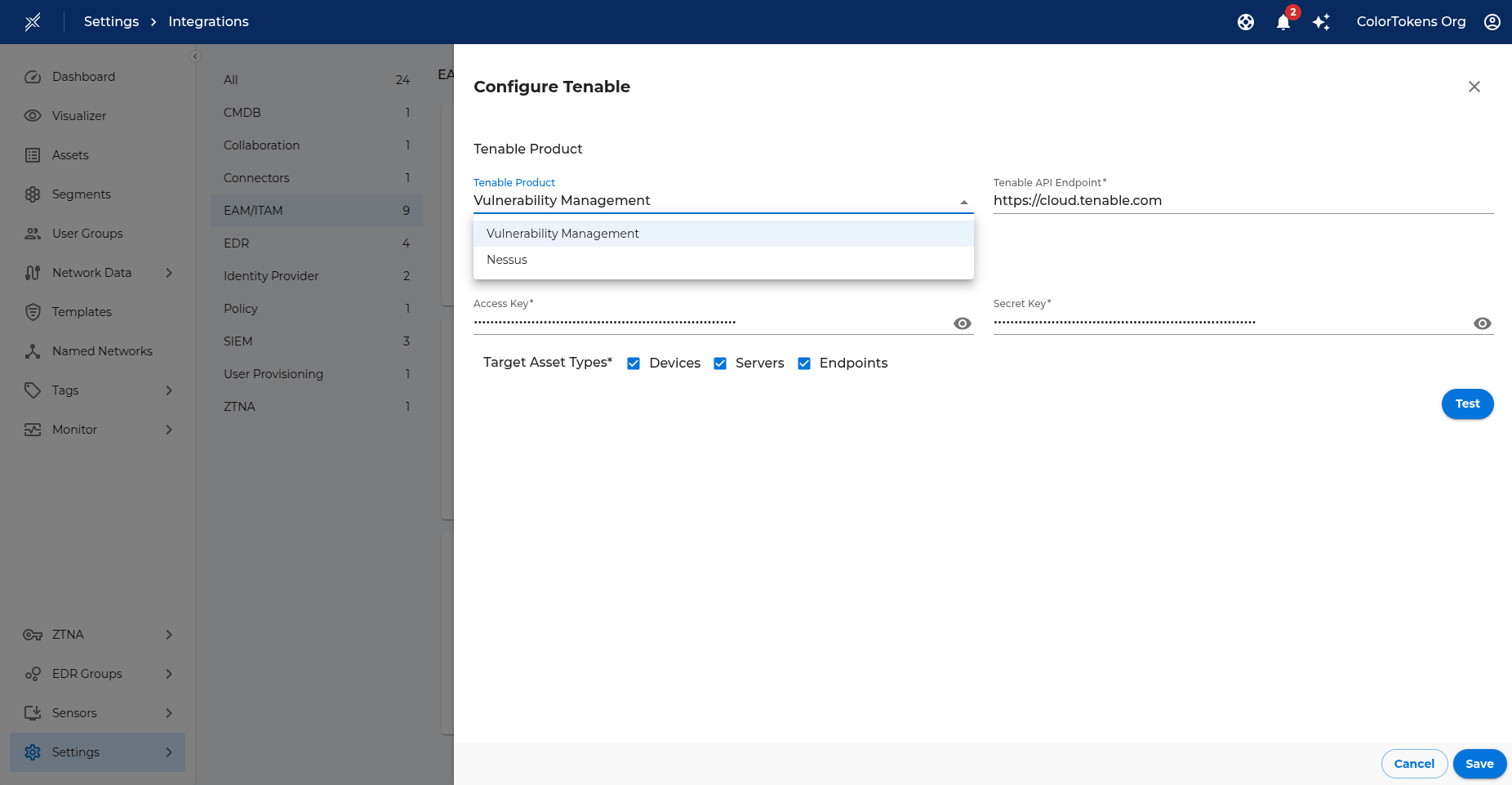
Select the OT/IoT/IT category and click Activate on Tenable.
-
In the Tenable Product section:
- Tenable Product – Select either Vulnerability Management (for Tenable.io) or Nessus from the dropdown.
- Tenable API Endpoint –
- For Vulnerability Management: The endpoint is pre-populated with
https://cloud.tenable.com. Do not change this value. - For Nessus: Enter the base URL of your Nessus deployment, including the scheme and port (e.g.,
https://nessus.example.com:8834).
- For Vulnerability Management: The endpoint is pre-populated with
-
In the Tenable Credentials section, enter:
- Access Key – API Access Key from Tenable/Nessus.
- Secret Key – API Secret Key from Tenable/Nessus.
-
In the Target Asset Types section, select the types of assets for which you want to import vulnerability data:
- Devices – Import for Gatekeeper's managed & unmanaged assets.
- Servers – Import for Server assets.
- Endpoints – Import for Endpoint assets.
-
Click Test to validate the credentials and connectivity.
-
If the test succeeds, click Save to enable the integration.
-
A success message is logged under Monitor > Logs confirming activation.
-
Once enabled, Xshield immediately initiates a sync job to fetch Vulnerability data from Tenable. After the initial sync completes, Xshield schedules a job every 24 hours to update Vulnerability data from Tenable.
Attribute Mapping
Note: Only devices whose MAC address matches an existing Xshield asset are updated.
The Tenable integration focuses primarily on vulnerability data and does not modify core tags. However, it does enrich assets with useful metadata through asset attributes and properties.
Asset Attributes (searchable)
| Tenable Attribute | Xshield Asset Attribute |
|---|---|
| Operating Systems | OS Name |
Properties (for tag rules)
These properties can be used to create tag rules and are automatically applied to matched assets.
| Tenable Attribute | Xshield Property | Value Format |
|---|---|---|
| Asset ID | Tenable AssetID | String value |
| Has Agent | Has Tenable Agent | Boolean value (true/false) |
| Agent UUID | Tenable Agent UUID | String value |
| Asset Types | Tenable Asset Type | String value (first non-empty type) |
| Agent Names | Tenable Agent Name | String value (first non-empty agent name) |
| System Types | Tenable System Type | String value (can be multiple properties) |
| Network Name | Tenable Network Name | String value |
| First Scan Time | Tenable First Scan Time | Time bucket (see below) |
| Last Scan Time | Tenable Last Scan Time | Time bucket (see below) |
| Asset Created At | Tenable Asset Created At | Time bucket (see below) |
| Asset Updated At | Tenable Asset Updated At | Time bucket (see below) |
| Asset First Seen | Tenable Asset First Seen | Time bucket (see below) |
| Asset Last Seen | Tenable Asset Last Seen | Time bucket (see below) |
| Asset Deleted At | Tenable Asset Deleted At | Time bucket (see below) |
| Asset Terminated At | Tenable Asset Terminated At | Time bucket (see below) |
Note: Duration properties are displayed in fixed time range buckets:
- "Less than 12 hours ago"
- "Between 12 hours and 24 hours ago"
- "Between 1 day and 7 days ago"
- "Between 7 days and 30 days ago"
- "Between 30 days and 90 days ago"
- "Between 90 days and 6 months ago"
- "More than 6 months ago"
This bucketed format makes it easy to identify and categorize assets based on their scan or activity age.
Vulnerabilities
The Tenable integration is primarily focused on importing vulnerability data. Tenable and Nessus continuously scan your environment and correlate CVEs (Common Vulnerabilities and Exposures) with each discovered asset. Xshield imports these comprehensive vulnerability lists during every sync, enabling you to:
- Search for vulnerable devices – Quickly find assets that contain specific CVEs (e.g.,
CVE-2021-44228,CVE-2023-23397). - Create automated Tag Rules – Automatically tag assets based on their vulnerability profile:
- Tag all assets with critical severity CVEs (CVSS score ≥ 9.0)
- Tag assets containing specific vulnerabilities of concern
- Tag assets that haven't been scanned recently
- Prioritize remediation – Identify high-risk assets requiring immediate patching or isolation.
- Segment vulnerable assets – Use imported CVE data to create network segments that isolate high-risk devices until they can be patched.
The vulnerability data imported from Tenable/Nessus includes:
- CVE IDs – Standard vulnerability identifiers
- Severity scores – CVSS v2 and v3 scores indicating vulnerability criticality
- Affected products – Software and hardware components impacted by each CVE
- Vendor information – Product manufacturers
- Version details – Specific software/firmware versions affected
This rich vulnerability intelligence integrates seamlessly with Xshield's zero-trust segmentation capabilities, allowing you to make informed decisions about network access, policy enforcement, and risk mitigation based on real-time vulnerability data.