Ordr
Overview
Ordr is a leading healthcare IoT security platform that provides comprehensive visibility, security, and asset management for connected medical and IoT devices. Ordr automatically discovers and profiles every connected device, providing deep asset intelligence including device types, manufacturers, models, risk levels, and vulnerabilities – all without requiring agents or credentials.
Ordr's AI-powered platform continuously monitors device behavior, identifies anomalies, and detects threats across clinical, enterprise, and IoT environments. It provides real-time risk scoring, vulnerability management, and network segmentation guidance to protect critical infrastructure and sensitive patient data.
Xshield leverages Ordr's comprehensive API to import enriched device inventory and vulnerability data, automatically applying them as core tags, asset attributes, and properties in Xshield. This seamless integration eliminates manual tagging effort and enables you to immediately leverage Ordr's deep device intelligence for zero-trust segmentation, risk-based policies, and compliance reporting.
Prerequisites
Ordr
- An active Ordr deployment with API access enabled.
- Username and Password created in Platform API Integration in Ordr to read device inventory and vulnerability data.
- Ordr Endpoint – Base URL of your Ordr deployment (e.g.,
https://ordr.example.com). Must include the scheme (https://).
Xshield
- Admin role to enable the integration.
Integration
Follow the steps below to connect Ordr to Xshield:
-
Log in to Xshield and navigate to Integrations.
-
Select the OT/IoT/IT category and click Activate on Ordr.
-
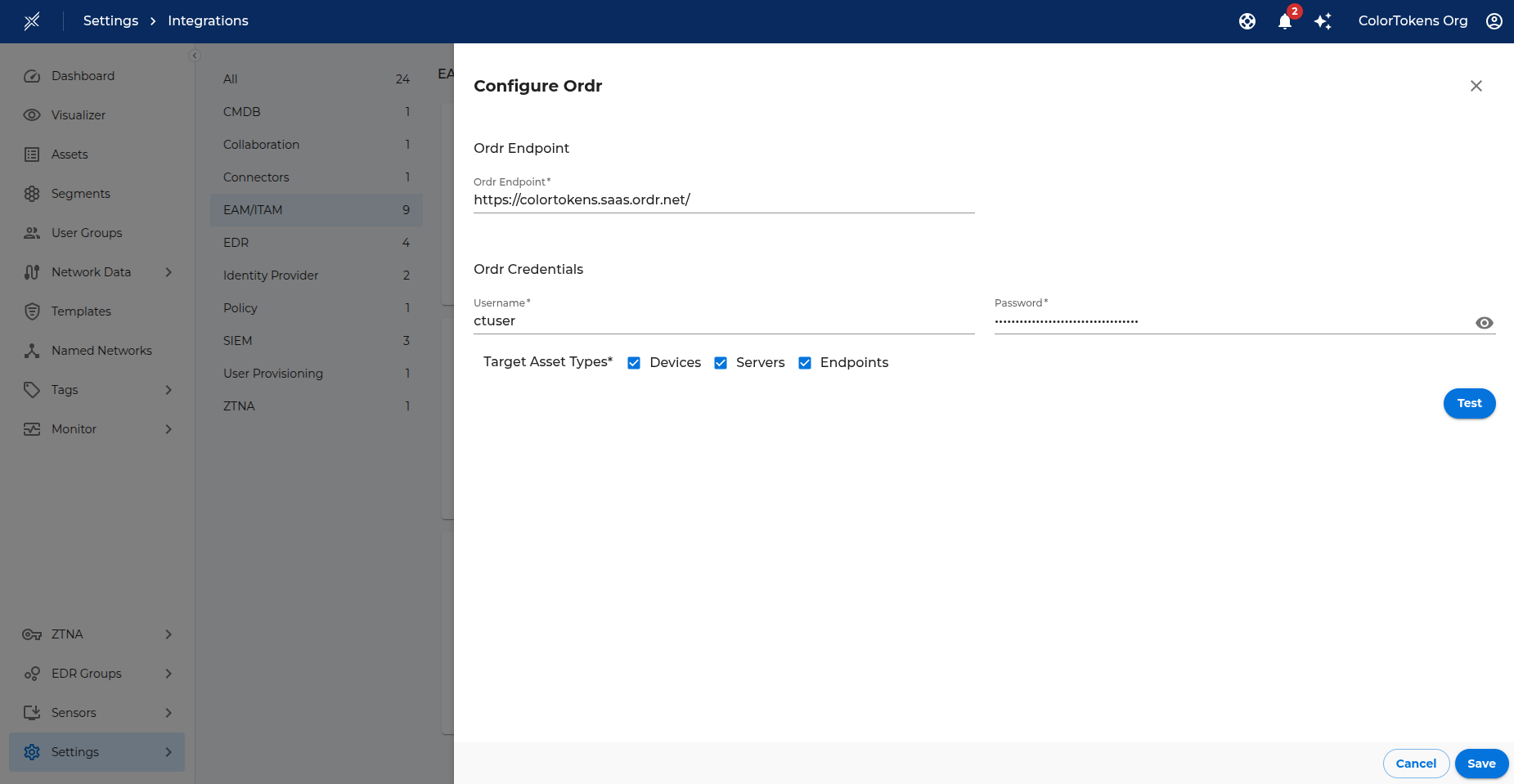
In the Ordr Endpoint section, enter:
- Ordr Endpoint – Base URL of your Ordr deployment, including the scheme (e.g.,
https://ordr.example.com).
- Ordr Endpoint – Base URL of your Ordr deployment, including the scheme (e.g.,
-
In the Ordr Credentials section, enter:
- Username – API username from Ordr.
- Password – API password from Ordr.
-
In the Target Asset Types section, select the types of assets for which you want to import data:
- Devices – Import for Gatekeeper's managed & unmanaged assets.
- Servers – Import for Server assets.
- Endpoints – Import for Endpoints assets.
-
Click Test to validate the credentials and connectivity.
-
If the test succeeds, click Save to enable the integration.
-
A success message is logged under Monitor > Logs confirming activation.
-
Once enabled, Xshield immediately initiates a sync job to fetch asset information from Ordr. After the initial sync completes, Xshield schedules a job every 24 hours to update asset information from Ordr.
Attribute Mapping
Note: Only devices whose MAC address matches an existing Xshield asset are updated.
The tables below show how Ordr attributes are mapped inside Xshield for both managed assets and unmanaged devices.
Managed Assets
Core Tags (for segments)
These core tags can be used for searching and creating segments.
| Ordr Attribute | Xshield Core Tag |
|---|---|
| Group | Category |
| MfgName/LongMfgName | Manufacturer |
| ModelNameNo | Model |
| DeviceLocation | Location |
| Profile | Subcategory |
| EndpointType | Role |
Asset Attributes (searchable)
| Ordr Attribute | Xshield Asset Attribute |
|---|---|
| SerialNo | Serial Number |
| OsType | OS Name |
| OsVersion | Kernel Version |
Properties (for tag rules)
These properties can be used to create tag rules.
| Ordr Attribute | Xshield Property | Value Format |
|---|---|---|
| Criticality | Ordr Criticality | String value |
| DeviceType | Ordr Device Type | String value |
| RiskState | Ordr Risk State | String value |
| RiskScore | Ordr Risk Score | Categorized: Normal(0), Low(0.1-3.9), Medium(4.0-6.9), High(7.0-8.9), Critical(9.0+) |
| KnownVulnRiskState | Ordr Known Vulnerability Risk State | String value |
| ConnStatus | Ordr Connection Status | String value |
| ClassificationState | Ordr Classification State | String value |
| HasExternalFlows | Ordr Has External Flows | String value |
| AccessType | Ordr Access Type | String value |
| VlanName | Ordr VLAN Name | String value |
| Subnet | Ordr Subnet | String value |
| SensorName | Ordr Sensor Name | String value |
| SensorIp | Ordr Sensor IP Address | String value |
| SwVersion | Ordr Software Version | String value |
| Fqdn | Ordr FQDN | String value |
| DhcpHostname | Ordr DHCP Hostname | String value |
| AlarmCount | Ordr Alarm Count | Categorized: 0, 1-9, 10-50, 50+ |
| FdaClass | Ordr FDA Class | Numeric value |
| HasPhi | Ordr Has PHI | Boolean value |
| IsBlacklisted | Ordr Is Blacklisted | Boolean value |
| Proxied | Ordr Is Proxied | Boolean value |
| DeviceName | Ordr Device Name | String value |
| DeviceSubCategory | Ordr Device Sub Category | String value |
| DhcpEnabled | Ordr DHCP Enabled | Boolean value |
| GuestDevice | Ordr Is Guest Device | Boolean value |
| NwLocation | Ordr Network Location | String value |
Unmanaged Devices
Core Tags
These core tags are applied to unmanaged devices when the Devices option is selected in Target Asset Types.
| Ordr Attribute | Xshield Core Tag |
|---|---|
| MfgName/LongMfgName | Device Manufacturer |
| Group | Device Category |
| Profile | Device Subcategory |
| ModelNameNo | Device Model |
| SwVersion | Device Version |
| SerialNo | Device Serial Number |
Vulnerabilities
Ordr continuously discovers and correlates CVEs (Common Vulnerabilities and Exposures) for each asset in your environment. Xshield imports these vulnerability lists during every sync, enabling you to:
- Search for devices that contain specific CVEs.
- Create Tag Rules that automatically tag vulnerable assets based on their CVE lists (for example, tag assets whose CVE list contains
CVE-2021-44228or other critical vulnerabilities). - Prioritize remediation efforts by identifying high-risk devices with known vulnerabilities.
- Generate compliance reports showing vulnerability posture across your OT/IoT environment.
The vulnerability data imported from Ordr includes CVE IDs, severity scores, and risk categorizations, providing comprehensive visibility into the security posture of your connected device infrastructure.