X-Ray Traces
Why enable X-Ray?
AWS X-Ray records requests as they travel through your application (Lambda, API Gateway, and other AWS SDK calls). When X-Ray is enabled and your AWS account is connected to Xshield, Xshield can read those traces and show you:
- Application trace visibility — See request flows across services, identify latency and errors, and understand how traffic moves through your APIs and functions.
- Faster troubleshooting — Trace a request end-to-end instead of correlating logs manually.
- Consistent view with network data — Combine trace data with VPC Flow Logs in Xshield for a full picture of traffic and application behavior.
The cross-account role you use for resource discovery already has permission to read X-Ray traces (see Reference: IAM permissions). You only need to enable X-Ray in the AWS services that handle your traffic so they emit traces; Xshield will then display them.
AWS X-Ray is a paid service. You are charged for traces recorded, retrieved, and scanned. See AWS X-Ray pricing for current rates and the free tier. If you are concerned about cost, consider sampling (e.g. record a fraction of requests) in your X-Ray sampling configuration to reduce trace volume; see Configuring sampling rules in the AWS documentation.
Before you begin
- Your AWS account is connected to Xshield (resource discovery completed).
- You know which Lambda functions, API Gateway APIs, or applications you want to trace.
What you'll do
| Goal | How | Section |
|---|---|---|
| Trace Lambda functions | Console or CLI — no code changes | Lambda Functions |
| Trace API Gateway REST APIs | Console or CLI — no code changes | API Gateway (REST APIs) |
| Trace DynamoDB or S3 (and other AWS SDK calls) | Code change required — add the X-Ray SDK to your application | Application Instrumentation |
Lambda and API Gateway can be enabled in the AWS Console or CLI. DynamoDB and S3 (and other AWS SDK calls) require instrumenting your application with the X-Ray SDK so those calls are recorded as segments in traces.
Lambda Functions
Enable tracing via AWS Console
- Open AWS Lambda in the AWS Console.
- Select the Lambda function you want to trace.
- Go to Configuration.
- Select Monitoring and operations tools.
- Under Additional monitoring tools, click Edit.
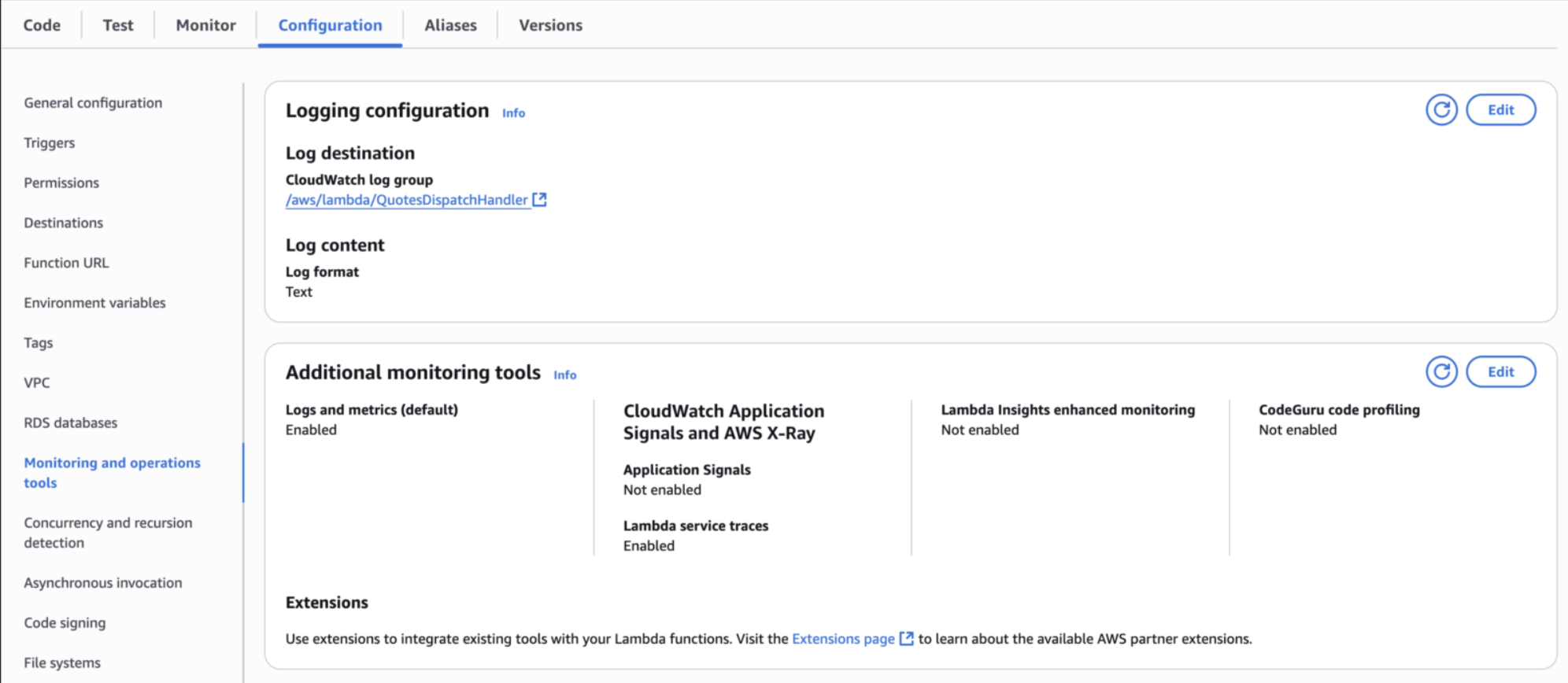
- In AWS X-Ray, enable Lambda service traces.

- Click Save.
Enable tracing via AWS CLI
aws lambda update-function-configuration \
  --function-name <your-lambda-function-name> \
  --tracing-config Mode=Active
API Gateway (REST APIs)
Enable tracing via AWS Console
- Open API Gateway in the AWS Console.
- Select the REST API you want to trace.
- Go to Stages.
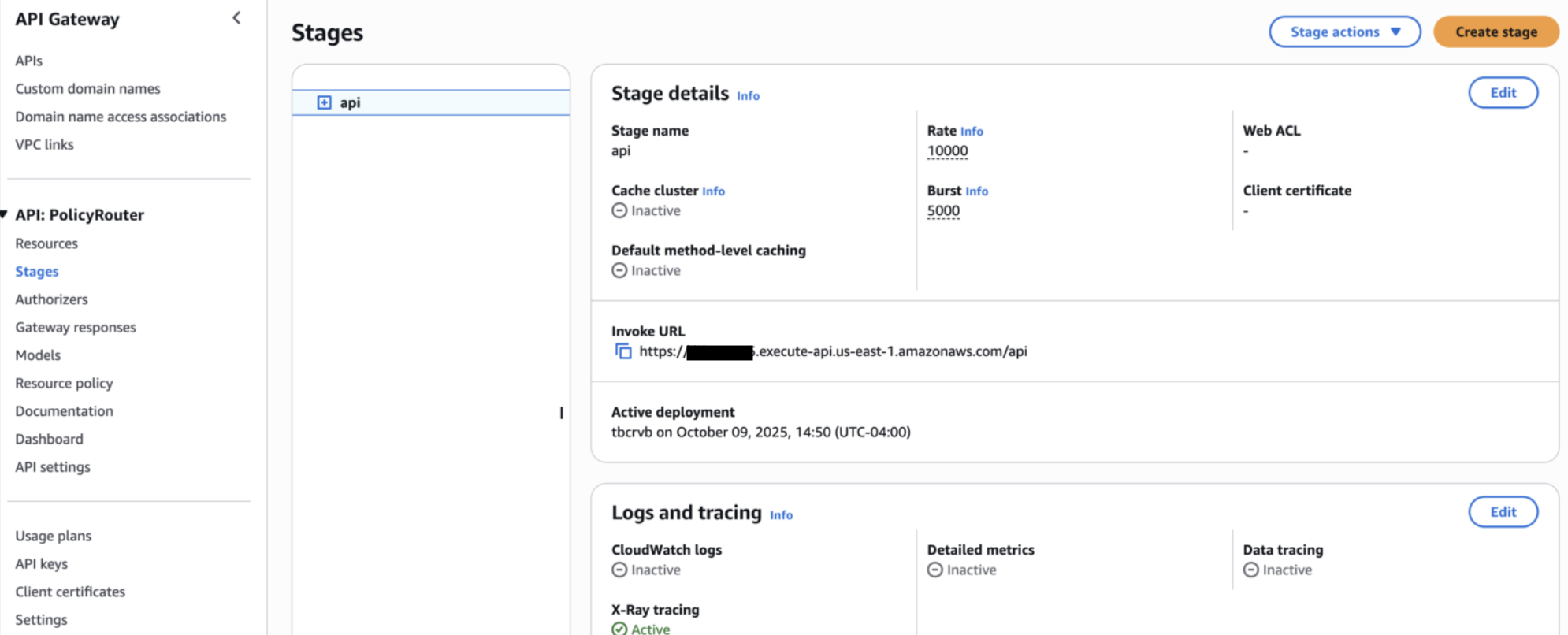
- Under Logs and tracing, click Edit.
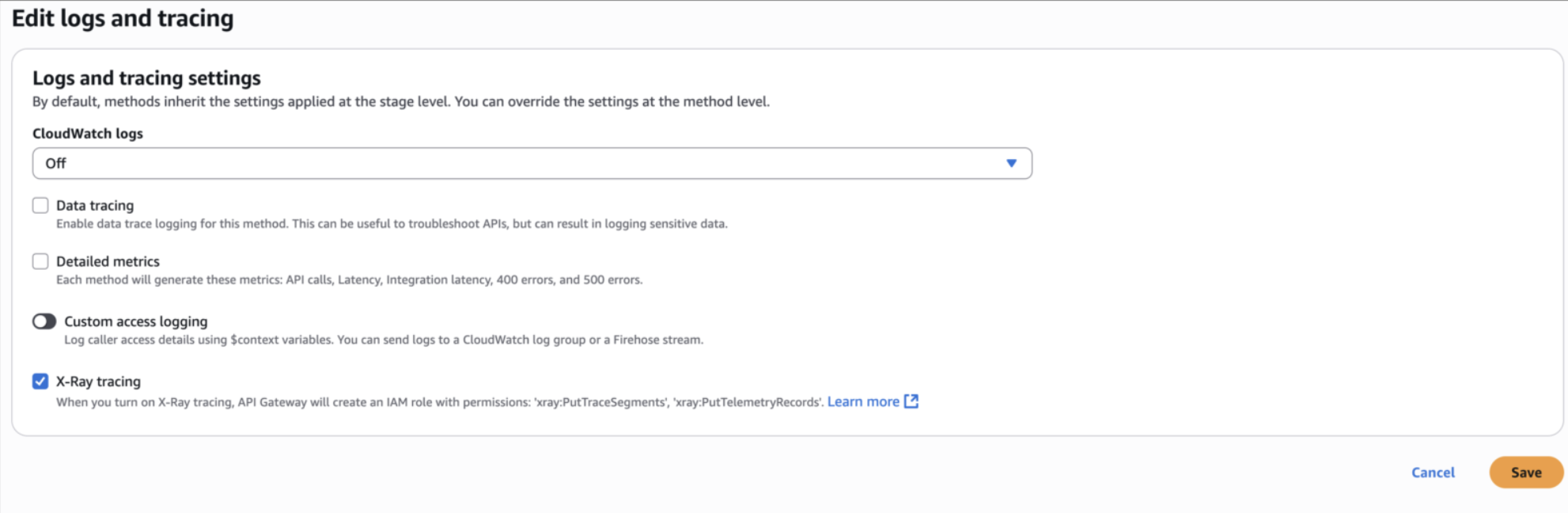
- Enable X-Ray tracing.
- Click Save.
Enable tracing via AWS CLI
aws apigateway update-stage \
  --rest-api-id <rest-api-id> \
  --stage-name <stage-name> \
  --patch-operations op=replace,path=/tracingEnabled,value=true
Application Instrumentation (DynamoDB and S3)
If your Lambda or other application calls DynamoDB, S3, or other AWS SDK services, those calls appear in X-Ray only if your code is instrumented with the X-Ray SDK. Enabling X-Ray on Lambda (above) records the Lambda invocation; adding the SDK records each DynamoDB or S3 call as a segment so you can see latency and errors per operation. Use the examples below to patch your AWS SDK clients (Python, Node.js, or Java).
DynamoDB
Python
Installation:
pip install aws-xray-sdk
Basic setup:
import boto3

from aws_xray_sdk.core import patch_all

patch_all()

dynamodb = boto3.resource("dynamodb", region_name="us-east-1")
table = dynamodb.Table("your-table-name")


def lambda_handler(event, context):
    response = table.get_item(Key={"id": "123"})
    table.put_item(Item={"id": "456", "name": "example"})
    return response
Node.js
Installation:
npm install aws-xray-sdk-core
Basic setup:
const AWSXRay = require("aws-xray-sdk-core");
const AWS = AWSXRay.captureAWS(require("aws-sdk"));

const dynamodb = new AWS.DynamoDB.DocumentClient();

exports.handler = async () => {
  const result = await dynamodb
    .get({
      TableName: "your-table-name",
      Key: { id: "123" },
    })
    .promise();

  await dynamodb
    .put({
      TableName: "your-table-name",
      Item: { id: "456", name: "example" },
    })
    .promise();

  return result;
};
Express example:
const AWSXRay = require("aws-xray-sdk-core");
const express = require("express");

const app = express();

app.use(AWSXRay.express.openSegment("MyApp"));

app.get("/api/data", (req, res) => {
  res.sendStatus(200);
});

app.use(AWSXRay.express.closeSegment());
Java
Maven dependencies:
<dependency>
  <groupId>com.amazonaws</groupId>
  <artifactId>aws-xray-recorder-sdk-core</artifactId>
  <version>2.4.0</version>
</dependency>

<dependency>
  <groupId>com.amazonaws</groupId>
  <artifactId>aws-xray-recorder-sdk-aws-sdk</artifactId>
  <version>2.4.0</version>
</dependency>
Basic setup:
import com.amazonaws.xray.AWSXRay;
import com.amazonaws.xray.handlers.TracingHandler;
import com.amazonaws.services.dynamodbv2.AmazonDynamoDB;
import com.amazonaws.services.dynamodbv2.AmazonDynamoDBClientBuilder;

public class MyApplication {
    private static final AmazonDynamoDB dynamoDB = AmazonDynamoDBClientBuilder
        .standard()
        .withRequestHandlers(new TracingHandler(AWSXRay.getGlobalRecorder()))
        .build();
}
S3
Python
import boto3

from aws_xray_sdk.core import patch_all

patch_all()

s3 = boto3.client("s3")


def lambda_handler(event, context):
    response = s3.list_buckets()
    s3.get_object(Bucket="my-bucket", Key="my-file.txt")
    s3.put_object(Bucket="my-bucket", Key="new-file.txt", Body="Hello World")
    s3.delete_object(Bucket="my-bucket", Key="old-file.txt")
    return response
Node.js
const AWSXRay = require("aws-xray-sdk-core");
const AWS = AWSXRay.captureAWS(require("aws-sdk"));

const s3 = new AWS.S3();

exports.handler = async () => {
  const listResult = await s3
    .listObjectsV2({ Bucket: "my-bucket" })
    .promise();

  await s3
    .getObject({ Bucket: "my-bucket", Key: "my-file.txt" })
    .promise();

  await s3
    .putObject({ Bucket: "my-bucket", Key: "new-file.txt", Body: "Hello World" })
    .promise();

  return listResult;
};
Java
import com.amazonaws.xray.AWSXRay;
import com.amazonaws.xray.handlers.TracingHandler;
import com.amazonaws.services.s3.AmazonS3;
import com.amazonaws.services.s3.AmazonS3ClientBuilder;

public class S3Example {
    private static final AmazonS3 s3Client = AmazonS3ClientBuilder
        .standard()
        .withRequestHandlers(new TracingHandler(AWSXRay.getGlobalRecorder()))
        .build();
}
References
- https://docs.aws.amazon.com/xray/latest/devguide/xray-sdk-nodejs.html
- https://docs.aws.amazon.com/xray/latest/devguide/xray-scorekeep.html
- https://docs.aws.amazon.com/xray/latest/devguide/xray-sdk-python.html
- https://docs.aws.amazon.com/xray/latest/devguide/xray-services-lambda.html
- https://docs.aws.amazon.com/xray/latest/devguide/xray-sdk-python-awssdkclients.html
- https://docs.aws.amazon.com/xray-sdk-for-python/latest/reference/thirdparty.html